Google Search is changing. People are no longer relying only on typing keywords into a search box. They can now search using images, their smartphone cameras, and visual search features to discover information online.
But here is an important question for website owners and digital marketers: How do you know whether your website is getting visitors through these visual searches?
Google has introduced a new multimodal search reporting feature in Google Search Console to help answer that question. This update gives website owners more insight into how people discover their content through image-based searches.
Let’s understand what this update means and how you can use it to improve your SEO strategy.
What Is Multimodal Search?
Multimodal search allows users to search for information using different types of input, including images and text, instead of relying only on typed keywords.
For example, imagine someone sees a pair of shoes they like while shopping. Instead of searching for “black running shoes for men,” they can take a picture of the shoes and use Google Lens to find similar products online.
Similarly, someone can upload an image of a plant to learn its name or use Circle to Search to discover more about an object they see on their phone.
These are examples of visual search experiences that help people find relevant information in a more natural way.
For businesses and website owners, this creates another opportunity to reach potential customers through their visual content.
What Is New in Google Search Console?
On September 24, 2026, Google announced multimodal search performance reporting in Search Console.
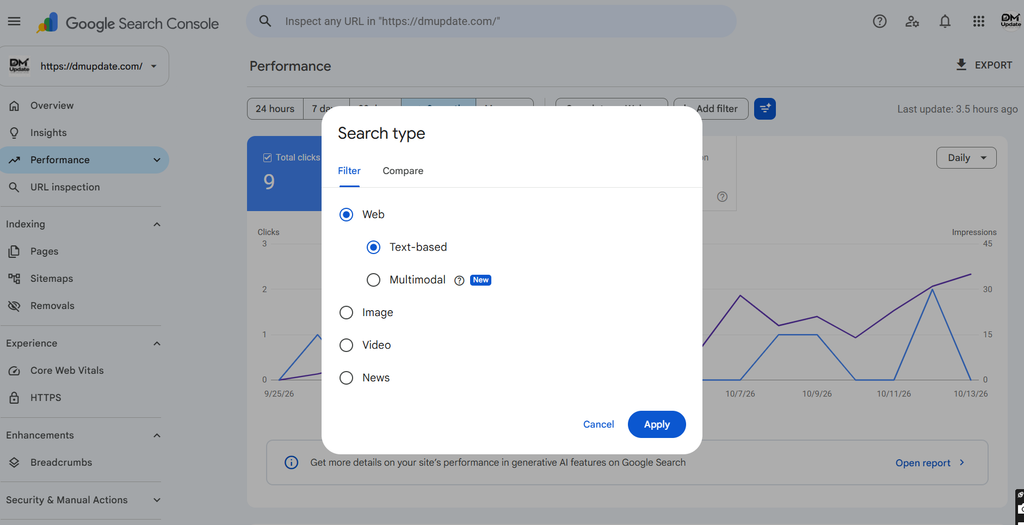
Previously, website owners could analyse search performance using metrics such as clicks, impressions, click-through rate (CTR), and average position. With this update, eligible websites can also explore performance data associated with multimodal searches.
Google’s update covers visual search activity from:
- Google Lens: Search using images or a smartphone camera.
- Circle to Search: Find information about items displayed on an Android screen.
- Image uploads: Upload an image to Google Search to discover related information.
- Chrome’s “Search this image” feature: Use the browser’s image search option to explore an image.
Google is rolling out this reporting globally. You will see relevant metrics when your website receives traffic from these search experiences.
How to Check Multimodal Search Traffic in Google Search Console
Want to see whether your website is receiving traffic from visual searches? Follow these steps.
Step 1: Open Google Search Console
Visit Google Search Console and select the website property you want to analyse.
Step 2: Open the Performance report
Navigate to the Search results performance report.
Step 3: Find the multimodal search type filter
Use the new multimodal search type filter in the performance reports to explore the relevant data.
Step 4: Review your performance metrics
Analyse the available clicks, impressions, CTR, and other relevant metrics to understand how your website performs.
Step 5: Export the report
Google also allows you to export the data so you can analyse it in spreadsheets or other reporting tools.
The update also includes reporting in the Generative AI features performance report. This can help website owners examine their visibility across the supported search experiences.
Note: The available data depends on your website’s traffic and the reporting options shown in your Search Console account.
Why Does Multimodal Search Matter for SEO?
Let’s look at a practical example.
Imagine you run an online clothing store. You have product pages featuring shirts, trousers, dresses, and footwear.
A potential customer might not know the exact name of a product. Instead, they may use an image to find similar styles.
If your website has useful product images and relevant product information, your pages may have an opportunity to appear in these discovery journeys.
Here are four reasons why this development matters.
1. Visual Content Is Becoming More Important
Images are no longer just decorative elements on a website. They can help users discover products, services, and information.
Use clear, relevant images that accurately represent your content. Avoid using unrelated stock images simply to fill empty spaces.
2. SEO Reporting Can Become More Detailed
Understanding where visitors come from helps you make better marketing decisions.
Multimodal reporting gives website owners another way to investigate how people discover their content, rather than relying only on traditional keyword-based search analysis.
3. E-commerce Websites Can Find New Opportunities
For online stores, product images can play an important role in discovery.
Clear product photography, descriptive product names, useful specifications, and accurate product information can make pages more helpful to both users and search systems.
4. Content Creators Can Better Understand Their Audience
Educational websites, blogs, travel websites, and DIY publishers can also benefit from understanding visual search behaviour.
For instance, someone looking for a home interior idea might begin with an image rather than a written search query. A useful article with relevant images could help them explore the topic further.
5 Practical Image SEO Tips to Follow in 2026
You do not need to redesign your entire website because of this update. Start by improving the visual content you already have.
1. Use descriptive image file names
Instead of uploading an image named IMG1234.jpg, use a meaningful name such as digital-marketing-strategy.jpg when it accurately describes the image.
2. Write helpful alt text
Alt text should describe the image in a natural and useful way. It supports accessibility and helps search engines understand the image’s context.
For example:
Poor alt text: marketing image
Better alt text: Digital marketer analysing website traffic in an analytics dashboard
3. Add relevant images to your blog posts
Use original screenshots, examples, product photos, diagrams, or other visuals that genuinely support the topic.
4. Keep images relevant to the page
If you publish an article about SEO tools, choose images that relate to SEO tools. Avoid adding unrelated visuals just to increase the image count.
5. Make your images accessible and technically sound
Use appropriate image formats, compress large files, and ensure important images can be discovered and accessed by search engines. Also, check that your website works well on mobile devices.
Remember, these are general image SEO best practices, not a guarantee that your images will appear in multimodal search results.
Does Multimodal Search Replace Traditional SEO?
No. Multimodal search reporting adds another perspective to SEO analysis; it does not replace traditional SEO.
Website owners should continue focusing on:
- Helpful, original content that answers users’ questions.
- Relevant keywords and natural content structure.
- Technical SEO, including crawlability and indexability.
- Good page experience and mobile usability.
- Relevant internal links and useful website navigation.
- High-quality images that support the page’s purpose.
The goal is to create a website that helps people find the information they need, whether they begin their search with words, images, or a combination of both.
What Should Digital Marketers Do Next?
If you manage SEO for a business or client, this is a good time to review your current reporting process.
Start by checking your Search Console account, exploring the new filter, and recording any available multimodal search performance data.
Then identify the pages and images that could benefit from improvement. Compare the data over time rather than making major decisions based on a single report.
For agencies and marketing teams, exporting the data into a spreadsheet can also help you include visual search performance in your regular SEO reports.
One important point: Do not assume that every website will immediately show multimodal search traffic. If your website has not received relevant traffic, the corresponding metrics may not appear.
Final Thoughts
Search behaviour is evolving, and visual discovery is becoming an important part of the search experience.
Google’s new multimodal reporting feature gives website owners another way to understand how users discover their content. For SEO professionals, the real value lies in using that information to make smarter decisions about content, images, and website optimisation.
Rather than chasing every new SEO trend, focus on creating useful content, improving your visual assets, and measuring what actually works for your audience.
Is your website ready for the next stage of search? Start by reviewing your Search Console data and identifying opportunities to make your content easier to discover.
Frequently Asked Questions
1. What is multimodal search in SEO?
Multimodal search allows users to find information using inputs such as images, rather than relying only on typed text queries.
2. What is the new Google Search Console update in September 2026?
Google introduced multimodal search performance reporting, allowing website owners to explore relevant visual search performance data through a new search type filter.
3. How can I check multimodal search performance?
Open Google Search Console, navigate to the relevant Performance report, and look for the multimodal search type filter.
4. Does image optimisation guarantee better rankings?
No. Image optimisation helps make visual content more accessible and understandable, but it does not guarantee rankings or visibility in visual search.
5. Is multimodal search important for e-commerce SEO?
It can be useful because customers may discover products through images. Clear product photography and accurate product information can support these discovery journeys.
Source
Google Search Central: Announcing web multimodal Search performance reporting in Search Console
Hi, this is a comment.
To get started with moderating, editing, and deleting comments, please visit the Comments screen in the dashboard.
Commenter avatars come from Gravatar.